STRUCTURED PROGRAMMING
4. CONTROL STRUCTURE
CONTROL STRUCTURES
A control structure is a block of programming that analyses variables and chooses a direction in which to
go based on a given flow control. Flow control determines how a computer will respond when given certain
conditions and parameters. Control structures are grouped into three, namely:
Sequential control structures
Selection control structures
Repetition/ looping/ Iteration control structures
Sequential Control Structures
This is the default mode or programming. It is line by line execution of program code statements form start
to the end.
Selection Control Structures
It is a group of control structures used for decisions and branching, that is, choosing between two or more
alternative paths (or block of program statements) to be executed. They include:
IF .. THEN
IF .. THEN .. ELSE
Nested IF
CASE … OF
IF .. THEN
The IF statement is a simple control that tests whether a condition is true or false, if the condition is true,
then an action occurs or given statements are executed otherwise, if the condition is false, nothing is done.
The one-way branch format is:
IF BooleanExpression THEN
StatementIfTrue;
If the Boolean expression evaluates to true, the statement executes. Otherwise, it is skipped. The IF statement accepts only one statement. If you would like to branch to a compound statement, you must use a
begin-end to enclose the statements:
IF BooleanExpression THEN
BEGIN
Statement1;
Statement2
END;
For example, write a program to capture English, Kiswahili, Mathematics and Science marks scored by a
student in an exam. The program comments “Excellent Work!!!” when the student’s average is 60 and above
PROGRAM commenting(input, output);
VAR eng,kis,mat,sci:Integer;
Avg:real;
BEGIN
Writeln;writeln;
Write(‘Enter English, Kiswahili, Mathematics and Science’);
Readln(eng,kis,mat,sci);
Avg:=(eng+kis+mat+sci)/3;
If (Avg>=60) then
Writeln(‘Excellent Work!!!’);
Readln;
END;
IF .. THEN .. ELSE
This is a two way selection control structure, where a condition is tested and if true then an action occurs,
and when false an alternate action is taken:
IF BooleanExpression THEN
StatementIfTrue
ELSE
StatementIfFalse;
If the Boolean expression evaluates to FALSE, the statement following the else will be performed. Note that
you may NOT use a semicolon after the statement preceding the else. That causes the computer to treat it
as a one-way selection, leaving it to wonder where the else came from.
For example, write a program to capture English, Kiswahili, Mathematics and Science marks scored by a
student in an exam. The program comments “Excellent Work!!!” when the student’s average is 60 and
above otherwise it comments “Try again!!!’.
PROGRAM commenting(input, output);
VAR eng,kis,mat,sci:Integer;
Avg:real;
BEGIN
Writeln;writeln;
Write(‘Enter English, Kiswahili, Mathematics and Science’);
Readln(eng,kis,mat,sci);
Avg:=(eng+kis+mat+sci)/3;
If (Avg>=60) then
Writeln(‘Excellent Work!!!’)
Else
Writeln(‘Try again!!!’);
Readln;
END;
NESTED IF
This is a multi-way selection, simply nest if statements, that combin ELSE’s with other IF’s allowing several
tests to be made. In an IF -THEN-ELSEIF -THEN-ELSEIF -THEN structure, tests will stop as soon as a condition is true, that is, you’d probably want to put the most likely test first for efficiency :
IF Condition1 THEN
Statement1
ELSEIF Condition2 THEN
Statement2
ELSE
Statement3;
Or incase there are more than one statement in the construct then use:
IF Condition1 THEN
BEGIN
Statement1;
Statement2;
END
ELSEIF Condition2 THEN
BEGIN
Statement3;
Statement4;
END
ELSE BEGIN
Statement5;
Statement6;
END;
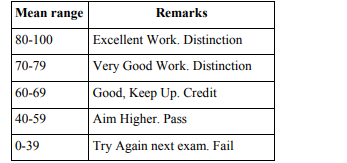
For example, write a program to capture English, Kiswahili, Mathematics and Science marks scored by a
student in an exam. The program remarks as follows based on student’s mean score: -
 PROGRAM commenting(input, output);
VAR eng,kis,mat,sci:Integer;
Avg:real;
Comment:string;
BEGIN
Writeln;writeln;
Write(‘Enter English, Kiswahili, Mathematics and Science’);
Readln(eng,kis,mat,sci);
Avg:=(eng+kis+mat+sci)/3;
If ((Avg>=60) AND (AVG<=100)) then
Comment:=‘Excellent Work. Distinction’
ElseIf ((Avg>=70) AND (AVG<=79)) then
Comment:=‘Very Good Work. Distinction’
ElseIf ((Avg>=60) AND (AVG<=69)) then
Comment:=‘Good, Keep Up. Credit’
ElseIf ((Avg>=40) AND (AVG<=59)) then
Comment:=‘Aim Higher. Pass’
Else
Comment:=‘Try Again next exam. Fail’;
Writeln;
Writeln(comment);
Readln;
END;
Exercise
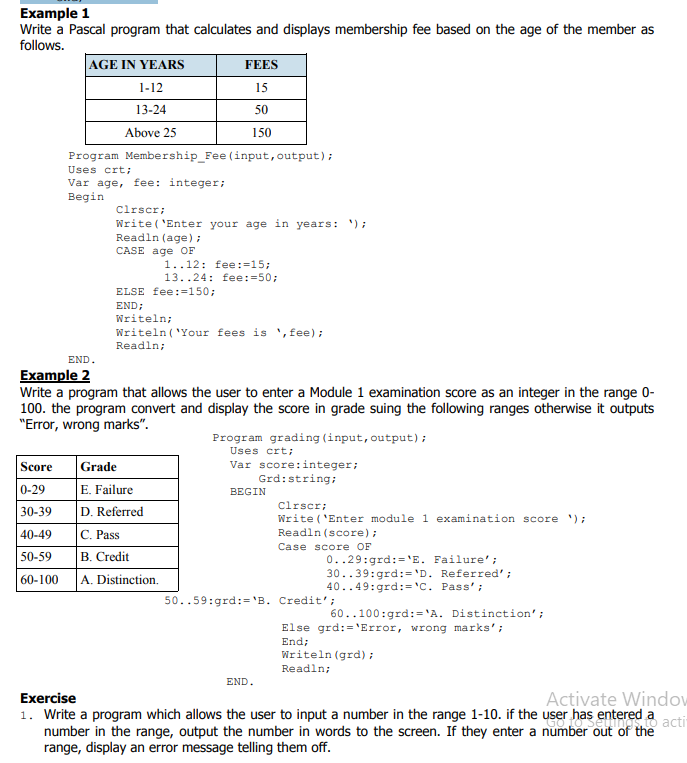
Write a program that prompts the user to enter two numbers and operator of the process to be performed.
Basing on the operator, the program process and outputs the answer on the screen. Otherwise, if the operator is invalid (not either /,+,- or *) the program dismisses with error message.
CASE .. OF
It is the alternative to nested IF control structure and preferred in some cases to reduce unnecessary program code. For instance, suppose you wanted to branch one way if b is 1, 7, 2037, or 5; and another way
if otherwise. You could do it by:
if (b = 1) or (b = 7) or (b = 2037) or (b = 5) then
Statement1
Elseif (b>1) and (b<7) then
Statement2
else
Statement3;
But in this case, it would be simpler to list the numbers for which you want Statement1 to execute. You
would do this with a case statement:
case b of
1,7,2037,5: Statement1;
2..6: Statement2;
otherwise Statement3
end;
The general form of the case statement is:
case selector of
List1: Statement1;
List2: Statement2;
...
Listn: Statementn;
otherwise Statement
end;
Or for block of statements
case selector of
List1: BEGIN
Statement1;
Statement2;
END;
List2: BEGIN
Statement3;
Statement4;
END;
...
...
otherwise BEGIN
Statementn;
Statementn+1;
END
END;
The otherwise part is optional and can be replaced with else as shown below.
case selector of
List1: Statement1;
List2: Statement2;
...
Listn: Statementn;
else Statement
end;
 Looping Control Structures
These are group of control structures that cause a block of program statements to be executed multiple
times. A loop is a section of code that repeats itself. A loop index or loop counter is an integer variable that
is used to keep track of how many times a loop has been executed. A loop limit is a variable or constant
that is integer valued, which determines the number of times a loop will execute, or a maximum value of
the loop index to be reached at the loop termination. They include:
1. FOR..DO
2. WHILE .. DO
3. REPEAT .. UNTIL
FOR .. DO
Looping means repeating a statement or compound statement over and over for specific number of times.
In Pascal, the fixed repetition loop is the for loop. The general form is:
FOR loop-index := initial-value to final-value DO
statement;
Where loop-index is the counter to be incremented
Initial-value is the beginning value of the loop index
Final-value is the ending value of the loop index.
For example
Write a program that outputs number 1-20 on vertically on the screen.
Program Numbers_1_20(output);
Uses crt;
Var counter:integer;
Begin
Clrscr;
For counter:=1 to 20 do
Writeln(counter);
Readln;
End.
The index variable must be of an ordinal data type. You can use the index in calculations within the body of
the loop, but you should not change the value of the index. An example of using the index is a program
that sums all whole numbers from 1 to 100:
Program sum_1_100(output);
Uses crt;
Var count,sum:integer;
Begin
sum := 0;
for count := 1 to 100 do
sum := sum + count;
Writeln(‘The sum of whole numbers from 1 to 100 is ‘,sum);
Readln;
End.
In the for-to-do loop, the starting value MUST be lower than the ending value, or the loop will never execute! If you want to count down, you should use the for-downto-do loop:
for index := StartingHigh downto EndingLow do
statement;
For example, a program that outputs numbers from 1 to 20 in descending order
Program Numbers_20_1(output);
Uses crt;
Var counter:integer;
Begin
Clrscr;
For counter:=20 downto 1 do
Writeln(counter);
Readln;
End.
Exercise
Write a program that display even numbers between 1 and 30 horizontally on the screen.
WHILE..DO
It is a conditional loop that is initiated and program statement(s) continues to be executed until a certain
condition is met/ satisfied. The statements may or never be executed at all basing on the condition set.
The pretest loop has the following format:
loop_initialization;
while BooleanExpression do
statement;
The loop continues to execute until the Booleanexpression becomes FALSE. In the body of the loop,
you must somehow affect the Boolean expression by changing one of the variables used in it. Otherwise an infinite loop will result:
a := 5;
while a < 6 do
writeln (a);
Remedy this situation by changing the variable's value:
a := 5;
while a < 6 do
begin
writeln (a);
a := a + 1
end;
The WHILE ... DO lop is called a pretest loop because the condition is tested before the body of the loop
executes. So if the condition starts out as FALSE, the body of the while loop never executes.
For example a program that displays number from 10 to 30 on horizontally on the screen.
Program nos_10_30(output);
CONST MAX=30;
VAR index:integer;
BEGIN
Index:=10; {Initialize first number to be displayed}
WHILE (index<=30) DO BEGIN
Write(index:5);
Index:=index+1; {increment index to next value in the series}
End;
Readln;
END.
REPEAT..UNTIL
It is a posttest loop, that is, it is similar to WHILE .. DO loop except that a condition is tested at the end of
block of statements, therefore statements are executed at least once. It has the following format:
loopinitilization;
repeat
statement1;
statement2
until BooleanExpression;
In a repeat loop, compound statements are built-in -- you don't need to use BEGIN-END. Also, the loop
continues until the Boolean expression is TRUE, whereas the while loop continues until the Boolean expression is FALSE.
This loop is called a posttest loop because the condition is tested AFTER the body of the loop executes.
The REPEAT loop is useful when you want the loop to execute at least once, no matter what the starting
value of the Boolean expression is.
For example a program that displays number from 10 to 30 on horizontally on the screen.
Program nos_10_30(output);
CONST MAX=30;
VAR index:integer;
BEGIN
Index:=10; {initialize first number to be displayed}
REPEAT
Write(index:5);
Index:=index+1; {increment index to next value in the series}
UNTIL (index>30); {repeat until the condition is true}
Readln;
END
These are values that which do not change during programs execution. An example would be the value of
PI, 3.141592654. In a program required to calculate the circumference of several circles, it would be simpler to write the word PI, instead of its value 3.141592654.
To declare constants, the keyword CONST is used, followed by the name of the constant, an equals sign,
the constants value, and semi-colon, eg,
CONST PI=3.141592654;
For example, a program to compute the area of a circle would be,
Program CIRCUMFERENCE (Input, Output);
Const PI=3.141592654;
Var Circumfer, Diameter: Real;
Begin
Writeln(‘Enter the diameter of the circle’);
Readln(Diameter);
Circumfer:=PI*Diameter;
Writeln(‘The circumference of the circle is ‘,Circumf:6:2);
End.
Exercise, write a program which prompts the user to input ordinary time and overtime worked, calculating
the gross pay. The rate is 4.20 per hour, and overtime is two times and half the rate.