STRUCTURED PROGRAMMING
| Site: | kibet394@collo |
| Course: | kibet394@collo |
| Book: | STRUCTURED PROGRAMMING |
| Printed by: | |
| Date: | Friday, 16 October 2026, 8:52 AM |
1. INTRODUCTION TO STRUCTURED PROGRAMMING
DEFINITIONS
1. Programming: is the process of developing computer instructions used to solve a particular task
using a programming language.
2. Programming language: is a set of symbols that can be translated into machine readable form by
the computer when arranged in a given syntax.
3. Syntax: is a special sequence or order of writing set of characters (symbols) in programming language
to perform a given task.
4. Structured programming: it is a style of programming that is based on use of control structures,
subprograms and indentation to create computer instructions.
5. Source program: this is the program code entered by the programmer in programming language
editor’s window that is yet to be translated into machine readable form.
6. Object code: this is the program code that is machine readable form.
7. Translators: these are language processors that covert source code program into object code.
Translators include: assemblers, interpreters and compilers
8. Assembler: this is a language processor that translate assembly language into machine language for a
computer to understand and execute.
9. Interpreter: it is a language processor that translates the source code program line-by-line allowing
the CPU to execute one line before translating the next line. This method of program translation was
used by early computers that did not have enough memory to store the object code as a file.
10. Compiler: it translates the entire source program into object code file that can be made executable by
Linking. The executable can be installed on other computers to perform the task programmed.
Examples of structured programming languages include; C, Pascal, Common Business-Oriented language
(COBOL), Formula Translator (FORTRAN), Ada, Beginners’ All-purpose Symbolic Instructional Code (BASIC)
etc.
HISTORY OF PROGRAMMING LANGUAGES
There are two levels of programming languages, namely; low-level and high-level programming languages.
1. Low-level Programming Languages
These are languages that require less or no translation for a computer to understand, that is, they are
already or almost in machine language. They are hardware-oriented hence not portable (a program written
for one computer can not be used on another). They include:
1. Machine language: It is also called First Generation language. This is a programming language where
program instructions are written using binary digits (bits). Given data and instructions are in binary
form, many code lines are needed to accomplish a simple task.
2. Assembly language: Also known as Second Generation Languages (2GLs). These are programming
languages whose instructions are written using mnemonics. Mnemonics are symbolic operation codes
composed of two or three words. For instance
MOV AX, 15 //Move 15 to register AX
SUB AX, 10 //Subtract 10 from the value in AX
Assembly languages overcame understanding and use of machine languages since they are readable
however, require an assembler to translate them to machine language for a computer to understand.
High-Level Programming Languages
These are languages whose instructions are English-like, can be read and understood even by nonprogrammers. High-level languages are machine independent and therefore the programmer is more
concerned with problem solving rather than how a machine operates. They include: -
1. Third generation languages (3GLs): these are also known as structured or procedural languages. They
emphasize the breaking of program code into smaller units (modules), control structure and indentations. These languages include Pascal, COBOL, BASIC, C, FORTRAN and Ada.
2. Fourth Generation Languages (4GLs): these are programming languages that present the programmer
with graphical tools such as buttons, forms and other tools for easier interface designs. Unlike the 3GLs
where the programmer has to come up with all code everything from scratch, 4GLs allow the
programmer to select the graphical objects (controls) and use them as design on base form. They
include Microsoft Visual Basic, Visual COBOL and Delphi Pascal.
3. Fifth Generation Languages (5GLs): these are languages that used in artificial intelligence that enable a
computer to depict human like intelligence. These languages include PROLOG, Mercury, LISP and
OCCAM.
PROGRAMMING PARADIGMS
These are ways in which programming languages are classified. A given language is not limited to a given
paradigm, for instance, Java supports elements of procedural, object-oriented and event-driven paradigms.
The paradigms include:
1. Unstructured/ monolithic programming: its is a programming paradigm in which all the code of the
program resides in a single large block. These languages do not support splitting of long program into
either functions, subroutines or methods that perform a particular task.
2. Structured programming: it is a paradigm that emphasize the use of control structures, sub programs
and indentation in writing program code. Structured programming does not allow the use of GOTO
statement to change the course of program execution. The languages that support this paradigm
include, Pascal, C, COBOL, BASIC, Ada etc.
3. Object-oriented programming: this is a programming paradigm in which the programmer designs both
data structures and operations applied to the data structures. The pairing of data structures and the
operations that can be performed on them is known as an object. A program therefore becomes a
collection of cooperating objects rather than a list of instructions. OOP languages includes Java, C++,
C#, Python etc
4. Visual programming: this is a programming paradigm where the programmer creates programs by
manipulating program elements graphically rather than textually. Visual programming frees the
programmer from having to write code but provide graphical objects to be used to create the interfaces
instead. Languages that support this paradigm include: Microsoft Visual Basic, Visual C#, Visual COBOL
etc.
5. Internet-based programming: this is a paradigm where the programmer creates web-based
applications. Since HTML is the basic design languages, to enhance HTML and web applications to
support the dynamic we requirements, server-side and client-side programming languages are used.
The languages include: Javascript, Java, PHP, Perl, Python, ASP etc
2. PROGRAM DESIGN AND DEVELOPMENT
PROGRAM DEVELOPMENT LIFECYCLE
These are stages the programmer must follow to come up with a program that solves the indented problem or task. The stages are as illustrated below
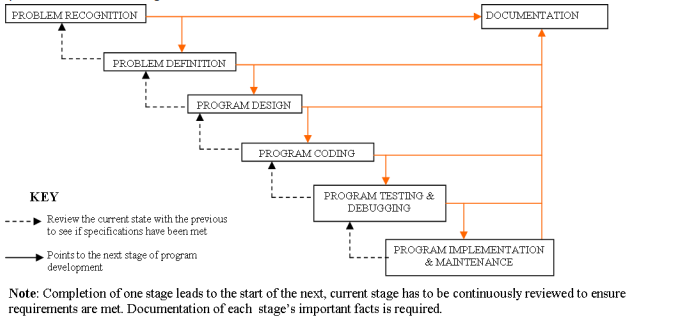 1. Problem recognition: This is the understanding and interpretation of a particular problem. To identify a
problem look for keywords such as compute, evaluate, compare, calculate etc and rewrite the problem
in a simplified way using the keyword. For instance, a mathematical problem of calculating the area of
a circle, is rewritten as A=Пr
2. Problem definition/Analysis: This is when programmer defines the likely input, processing activities and
expected outcome using keywords outlined at the problem recognition stage. This stage outlines a
clear view of what the program should produce, methods that can be used to solve the problem and
best alternative chosen. For instance, our problem A=Пr
2 has,
a. Input radius of the circle r
b. Process calculate the area of the circle П*r*r
c. Output Area of the circle A
3. Program design: This is the stage in which the programmer decides how the various goals of the
program are to be achieved. It shows the logical steps a program follows in order to solve a problem.
The programmer must analyze specifications and decide whether the program is monolithic or modular.
Program design tools such as algorithm, pseudo code, flowchart, structured charts and decision tables.
4. Program coding: This is the process of converting program design into its equivalent program using a
programming language. This stage results into source code program that can be translated into
machine readable form. The program coded should solve the targeted problem.
5. Program testing and debugging: when a programmer write programs, it is rare that the code will be
perfect. The program has to be tested to ensure it yields expected output, detect errors and debug
(correct the error). There are two types of errors (bugs) encountered during testing of a program,
namely: -
a. Syntax errors: These are errors that emanate from improper use of programming language
rule such as grammatical mistakes, misuse/ missing punctuation marks, improper naming of
variables, misspelling of user-defined and reserved words. Syntax errors must be debugged
before running the program.
b. Logical errors: These errors are also known as runtime errors. These are errors that are not
detected by translator but the program gives wrong output or halts during execution.
Methods used to detect errors in a program include the following: -
a. Desk checking (Dry-run): This is going through a program while its still on paper before entering
into programming language editor’s window. This help to detect syntax and logical errors.
b. Using debugging utilities: This is the use of translators to detect syntax errors in a program
already in programming language editor’s window. Most of the programming languages have
development IDEs with compiler that detect syntax errors, outline them and allow the
programmer to correct them before execution.
c. Using test data: This is carrying out trial runs of new program by entering data variation and
extremes (data with errors) to see whether the program halts. A good program should not crash
due to wrong data input but inform the user about the anomaly and request for correct data.
6. Implementation and maintenance: implementation is the actual delivery and installation of the new
program ready for use. Training of staff on use of the program is also done. That implemented
program is then reviewed (incase specifications are not met) and maintained.
Maintenance is an ongoing activity of evaluating implemented program to see whether it is performing
as expected. Errors and shortcomings detected are corrected.
PROGRAM DOCUMENTATION
This is the writing of support information explaining how the program can be used, installed, maintained
and modified. All stages of program development should be well documented. Documentation can be
either: -
a. Internal documentation: These are non-executable lines, called comments, in a source program that
enable a programmer to understand code statements. Internal documentation is part and parcel of
source program code.
b. External documentation: These are reference material for users, operators and programmers printed as
booklets. They specify user-manuals, installation manuals and programmer manuals.
There are three target groups for any documentation, namely: -
a. User-oriented documentation: These are reference material that enable user learn how to use a
program with little help from program developer.
b. Operator-oriented documentation: These are reference material for technical staff, it provides outline
on how to install and maintain the program.
c. Programmer-oriented documentation: This is documentation that provides technical information for the
future medication of the program. All programs need to modification or review to improve their
performance and suit changing environment.
2.1. PROGRAM DESIGN TOOLS
PROGRAM DESIGN TOOLS
Program design shows the logical steps a program follows in order to solve a problem. A poorly design
leads to development of a program that does not meet the specifications or indented tasks. Tools used in
program design include:
a. Algorithms,
b. Flowcharts,
c. Pseudo codes,
d. Structured charts and
e. Decision tables
ALGORITHM
It is a set of instructions which when correctly executed produces a solution to given problem. For instance,
an algorithm to find a word in a dictionary or changing a punctured tyre.
There will always be several algorithms (methods) for solving a problem. It is upon the programmer to
make the best choice of the algorithm to use with reasons. The algorithm developed must be easily
converted into computer instructions and therefore must have three categories of instructions: -
a. Input instructions: - Supply data to a program
b. Processing instructions: - Manipulates data into information
c. Output instructions: - Gets information out and present it to the user
For instance, an algorithm to compute the area of a circle (A), the algorithm will be,
Ask user to enter radius of the circle (r)
Store the value in r
Calculate the area of circle Пr
2
Store the value in A
Print the value of A
Stop
Once an algorithm is developed, we must check it to ensure that it does the task correctly by hand using
appropriate data. This is known as dry running or desk checking. Dry running aims at pin-pointing errors in
logic execution before the computer program is written.
PSEUDO CODES
This is a set of statements written in English-like form that express the processing logic of a program.
Some words may be drawn from programming languages and mixed with English to form structured
statements. Pseudo codes are not executable by a computer.
A good pseudo code must have the following features
a. The statement must be short, clear and readable
b. That statements must not have more than one meaning (not ambiguous)
c. Then statement lines should be clearly outlined and indented.
d. Pseudo code show clearly show START and STOP of executable statements and control structures
e. The input, output and processing statements should clearly be stated using keywords such as PRINT,
INPUT, READ etc.
For example, write a pseudo code to computer the area of a circle.
START
PRINT “Enter the radius of a circle”
READ r
A=Пr
2
PRINT A
STOP
Example 2, write a pseudo code that prompts the user to enter two numbers, calculate their sum and
average. Display the two numbers, sum and average on the screen.
START
PRINT “Enter the two numbers”
INPUT no1, no2
Sum=no1+no2
Average=Sum/2
PRINT no1, no2
PRINT Sum, Average
STOP.
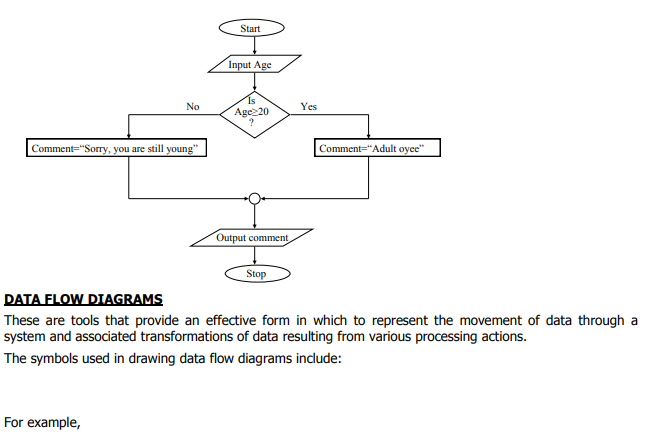
Example 3, write a pseudo code for a program that can be used to classify people according to age. If a
person is 18years and above, the program outputs “Adult, Oyee” otherwise it outputs “Young, Uuh”.
START
PRINT “Enter your age in years”
READ age
IF age≥18 THEN
Comment=“Adult, Oyee”
ELSE
Comment=“Young, Uuh”
PRINT comment
STOP
FLOWCHART
This is the diagrammatic representation of a program’s logical flow of execution using special symbols. The symbols used in program flowchart include;
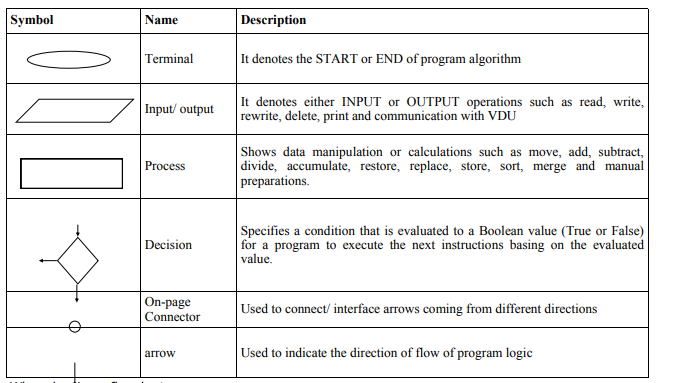 When drawing a flowchart;
i. There should be one starting and exit point of program algorithm
ii. Use correct symbol at each stage in program flowchart
iii. The logical flow of program should be clearly shown using arrows.
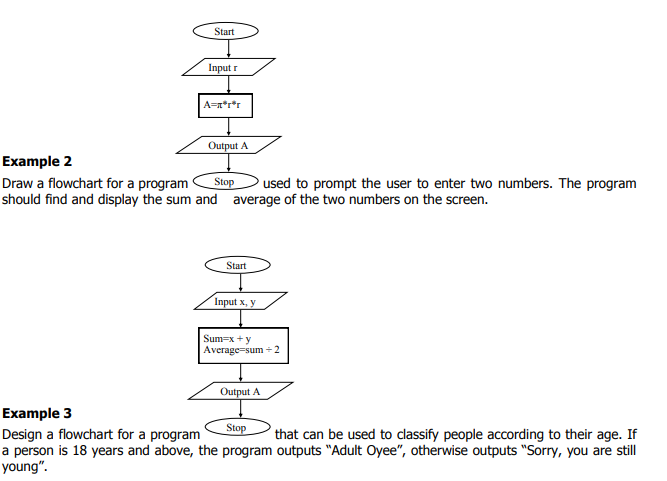
Example 1
Draw a flowchart for a program that calculates the area of a circle whose radius is entered by the user.
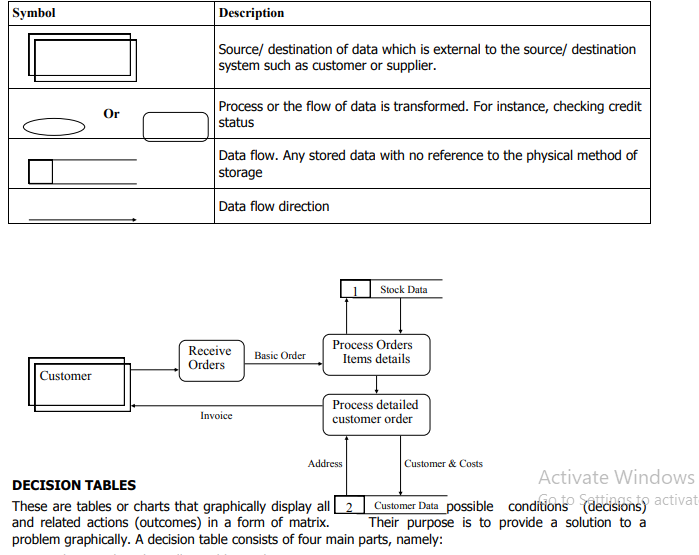 Condition stub: It lists all possible conditions present in a system
Condition entry: Shows all possible combinations of conditions after testing
Action stub: Lists all actions that may be taken to meet specific condition
Action entry: Lists all specific actions that should be followed for each combination of conditions
3. PROGRAMMING IN PASCAL
When talking about computer languages, there are basically three major terms that will be used.
1. Machine language -- actual binary code that gives basic instructions to the computer's CPU. These
are usually very simple commands like adding two numbers or moving data from one memory location
to another.
2. Assembly language -- a way for humans to program computers directly without memorizing strings
of binary numbers. There is a one-to-one correspondence with machine code. For example, in Intel x86
machine language, ADD and MOV are mnemonics for the addition and move operations.
3. High-level language -- permits humans to write complex programs without going step-by step. High
-level languages include Pascal, C, C++, FORTRAN, Java, BASIC, and many more. One command in a
high-level language, like writing a string to a file, may translate to dozens or even hundreds of machine
language instructions.
All computers can only run machine language programs directly. Assembly language programs
are assembled, or translated into machine language. Likewise, programs written in high-level languages,
like Pascal, must also be translated into machine language before they can be run. The technical
terminology for this operation is compiling.
The program that accomplishes the translation is called a compiler. This program is rather complex since it
not only creates machine language instructions from lines of code, but often also optimizes the code to run
faster, adds error-correction code, and links the code with subroutines stored elsewhere. For example,
when you tell the computer to print something to the screen, the compiler translates this as a call to a prewritten module. Your code must then be linked to the code that the compiler manufacturer provides before
an executable program results.
With high-level languages, there are again three terms to remember:
1. Source code -- the code that you write. This typically has an extension that indicates the language
used. For example, Pascal source code usually ends in ".PAS" and C++ code usually ends in ".CPP"
2. Object code -- the result of compiling. Object code usually includes only one module of a program,
and cannot be run yet since it is incomplete. On DOS/Windows systems, this usually has an extension
of ".OBJ"
3. Executable code -- the end result. All the object code modules necessary for a program to function
are linked together. On DOS/Windows systems, this usually has an extension of ".EXE"
Program Structure
The basic structure of a Pascal program is:
PROGRAM ProgramName (Input, Output);
CONST
(* Constant declarations *)
TYPE
(* Type declarations *)
VAR
(* Variable declarations *)
(* Subprogram definitions *)
BEGIN
(* Executable statements *)
End.
The elements of a program must be in the correct order, though some may be omitted if not needed.
Here's a program that does nothing, but has all the REQUIRED elements:
program DoNothing;
begin
end.
Pascal comments start with a (* and end with a *). You can't nest comments:
(* (* *) *)
will yield an error because the compiler matches the first (* with the first *), ignoring everything in
between. The second *) is left without its matching (*.
In Turbo Pascal, {Comment} is an alternative to (* Comment *). The opening brace signifies the beginning
of a block of comments, and the ending brace signifies the end of a block of comments.
Commenting has two purposes: first, it makes your code easier to understand. If you write your code
without comments, you may come back to it a year later and have a lot of difficulty figuring out what
you've done or why you did it that way. Another use of commenting is to figure out errors in your program.When you don't know what is causing an error in your code, you can comment out any suspect code
segments. Remember the earlier restriction on nesting comments? It just so happens that braces {}
supersede parenthesis-stars (* *). You will NOT get an error if you do this:
{ (* Comment *) }
So, if you have Turbo Pascal, I suggest using standard comments (* *), leaving the braces for debugging.
All spaces and end-of-lines are ignored by the Pascal compiler unless they are inside a string. However, to
make your program readable by human beings, you should indent your statements and put separate
statements on separate lines.
Identifiers
Identifiers are names that allow you to reference stored values, such as variables and constants. Also,
every program must be identified (get it?) by an identifier.
Rules for identifiers:
Must begin with a letter from the English alphabet.
Can be followed by alphanumeric characters (alphabetic characters and numerals), or the underscore
(_).
May not contain special characters, such as:~ ! @ # $ % ^ & * _ + ` - = { } [ ] : " ; ' < > ? , . / | \
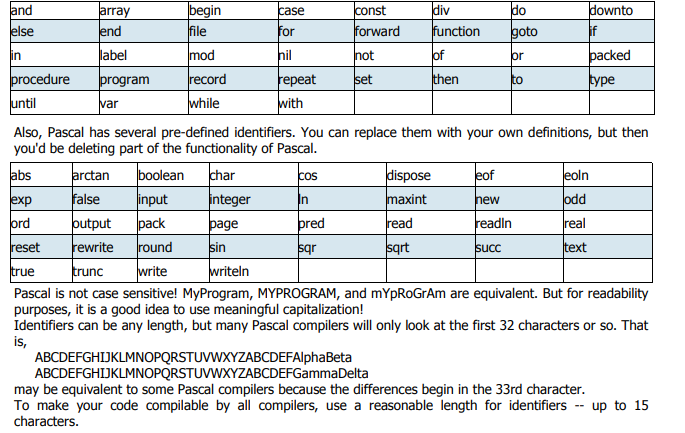
Several identifiers are reserved in Pascal -- you cannot use them as your own identifiers. They are:
V a r i a b l e s a n d D a t a T y p e s
Variables are similar to constants, but their values can be changed as the program runs. Unlike in BASIC
and other loosely-typed languages, variables must be declared in Pascal before they can be used:
var
IdentifierList1 : DataType1;
IdentifierList2 : DataType2;
IdentifierList3 : DataType3;
...
IdentifierList is a series of identifiers, separated by commas (,). All identifiers in the list are declared as
being of the same data type.
The main data types in Pascal are:
1. integer data type can contain integers from -32768 to 32767.
2. The real data type has a positive range from 3.4x10-38 to 3.4x1038. Real values can be written in
either fixed-point notation or in scientific notation, with the character E separating the mantissa from
the exponent. Thus, 452.13 is the same as 4.5213e2
3. The char data type holds characters. Be sure to enclose them in single quotes, or apostrophes: 'a',
'B', '+'. This data type can also hold system characters, such as the null character (ordinal value of 0)
and the false-space character (ordinal value of 255).
4. The Boolean data type can have only two values: TRUE and FALSE
5. The String data type holds a group of characters enclosed in single quotation mark such as ‘DICT’, ‘My
names are’ etc.
An example of declaring several variables is:
var
age, year, grade : integer;
circumference : real;
LetterGrade : char;
DidYouFail : Boolean;
A s s i g n m e n t a n d O p e r a t i o n s
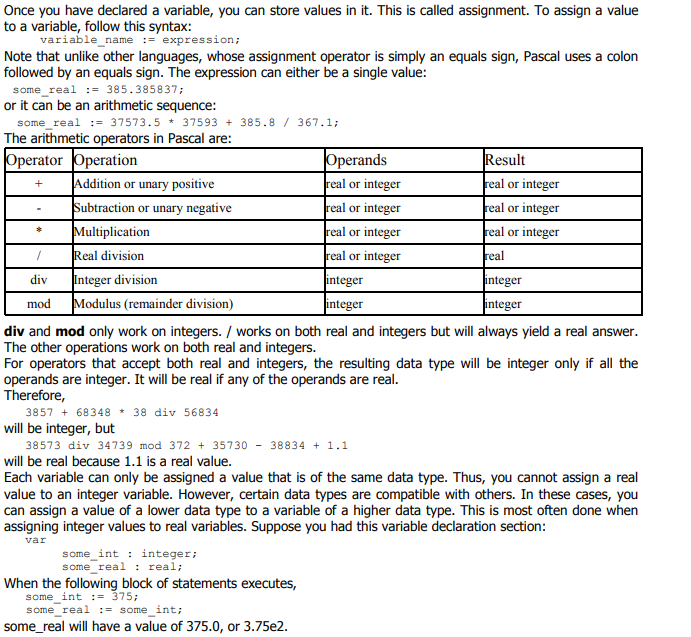 In Pascal, the minus sign can be used to make a value negative. The plus sign can also be used to make a
value positive. This, however, is unnecessary because values default to being positive.
Do not attempt to use two operators side by side!
some_real := 37.5 * -2;
This may make perfect sense to you, since you're trying to multiply by negative-2. However, Pascal will be
confused -- it won't know whether to multiply or subtract. You can avoid this by using parentheses:
some_real := 37.5 * (-2);
to make it clearer.
The computer follows an order of operations similar to the one that you follow when you do arithmetic:
* / div mod
+ -
The computer looks at each expression according to these rules:
1. Evaluate all expressions in parentheses, starting from the innermost set of parentheses and proceeding
to the outermost.
2. Evaluate all multiplication and division from left to right.
3. Evaluate all addition and subtraction from left to right.
The value of
3.5 * (2 + 3)
will be 17.5.
Pascal cannot perform standard arithmetic operations on Booleans. There is a special set of Boolean
operations. Also, you should not perform standard operations on characters because the results may vary
from compiler to compiler.
Punctuation and Indentation
Since Pascal ignores end-of-lines and spaces, punctuation is needed to tell the compiler when a statement
ends.
You MUST have a semicolon following:
the program heading
each constant definition
each variable declaration
each type definition (to be discussed later)
almost all statements
The last statement in the program, the one immediately preceding the END, does not require a semicolon.
However, it's harmless to add one, and it saves you from having to add a semicolon if suddenly you had to
move the statement higher up.
Indenting is not required. However, it is of great use for the programmer, since it helps to make the
program clearer. If you wanted to, you could have a program look like this:
program Stupid; const a=5; b=385.3; var alpha,beta:real; begin alpha := a + b; beta:= b / a end.
But it's much better for it to look like this:
program Stupid;
const
a = 5;
b = 385.3;
var
alpha,
beta : real;
begin (* main *)
alpha := a + b;
beta := b / a
end. (* main *)
In general, indent two to four spaces for each block. Skip a line between blocks (such as between the
const and var blocks).
Most importantly, use comments liberally! If you ever return to a program that you wrote ten years ago,
you probably wouldn't remember the logic unless you documented it. It is a good idea to comment the
main executable part of the program, to distinguish it from subprograms.
Input
Input means to read data into memory, either from the keyboard, the mouse, or a file on disk.
We will not get into mouse input in detail, because that syntax differs from machine to machine, and may
require a complicated interrupt call to the mouse driver. If you would like to see the source code for a
mouse support unit for DOS, click here. This unit will not work under Windows, Macintosh, or X-Windows,
because these operating systems handle all mouse input for you and do not let you interface with the
mouse directly.
The basic format for reading in data is:
read (Variable_List);
Variable_List is a series of variable identifiers separated by commas.
read, however, does not go to the next line. This can be a problem with character input, because the endof-line character is read as a space.
To read data and then go on to the next line, use
readln (Variable_List);
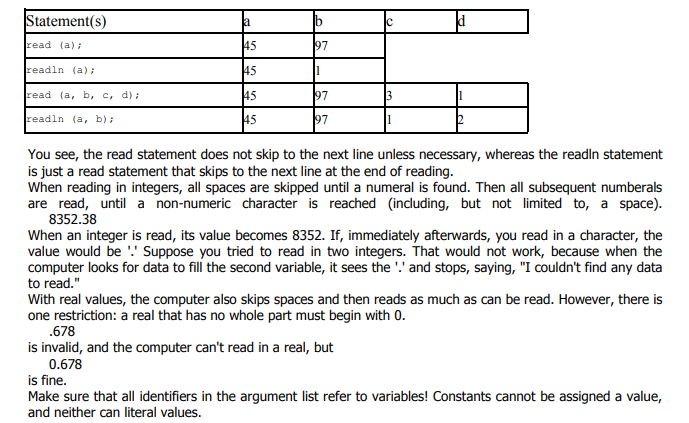
Suppose you had this input from the user, and a, b, c, and d were all integers.
45 97 3
1 2 3
This would be the result of various statements:
 Output
For writing data to the screen, there are also two statements:
write (Argument_List);
writeln (Argument_List);
The writeln statement skips to the next line when done. You can use strings in the argument list, either
constants or literal values. If you want to display an apostrophe within a string, use two consecutive
apostrophes.
Formatting output is quite easy. For each identifier or literal value on the argument list, use:
Value : field_width
The output is right-justified in a field of the specified integer width. If the width is not long enough for the
data, the width specification will be ignored and the data will be displayed in its entirety (except for real
values -- see below).
Suppose we had:
write ('Hi':10, 5:4, 5673:2);
The output (with a dash simulating the space) would be:
--------Hi---55673
For real values, you can use the aforementioned syntax to display scientific notation in a specified field
width, or you can convert to fixed notation with:
Value : field_width : decimal_field_width
The field width is the total field width, including the decimal part. The whole number part is always
displayed fully, so if you have not allocated enough space, it will be displayed anyway. However, if the
number of decimal digits exceeds the specified decimal field width, the output will be rounded to the
specified number of places (though the variable itself is not changed).
So
write (573549.56792:20:2);
would look like:
-----------573549.57
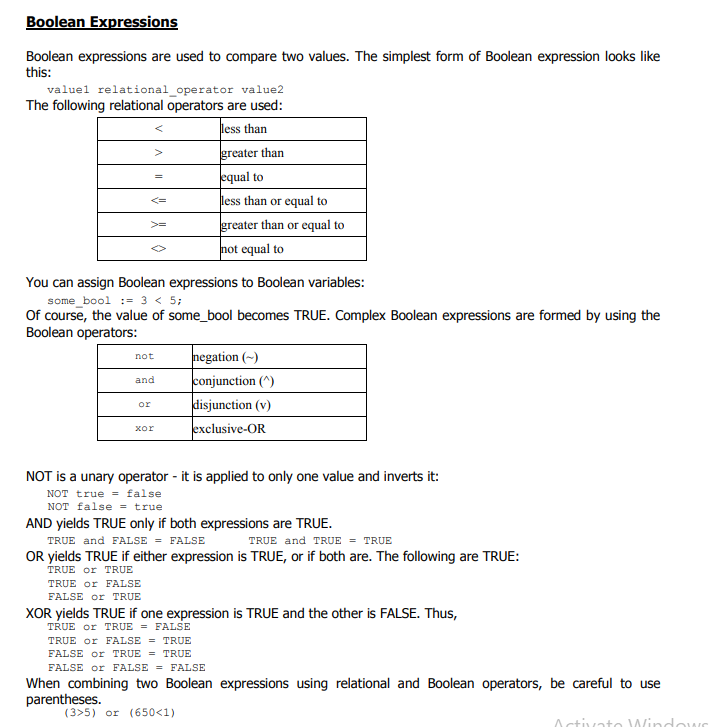 This is because the Boolean operators are higher on the order of operations than the relational operators:
not
* / div mod and
+ - or
< > <= >= = <>
This way,
3 > 5 or 650 < 1
becomes evaluated as
3 > (5 or 650) < 1
which makes no sense, because the Boolean operator or only works on Boolean values, not on integers.
The Boolean operators (AND, OR, NOT, XOR) can be used on Boolean variables just as easily as they are
used on Boolean expressions.
Whenever possible, don't compare two real values with the equals sign. Small round-off errors may cause
two equivalent expressions to differ
4. CONTROL STRUCTURE
CONTROL STRUCTURES
A control structure is a block of programming that analyses variables and chooses a direction in which to
go based on a given flow control. Flow control determines how a computer will respond when given certain
conditions and parameters. Control structures are grouped into three, namely:
Sequential control structures
Selection control structures
Repetition/ looping/ Iteration control structures
Sequential Control Structures
This is the default mode or programming. It is line by line execution of program code statements form start
to the end.
Selection Control Structures
It is a group of control structures used for decisions and branching, that is, choosing between two or more
alternative paths (or block of program statements) to be executed. They include:
IF .. THEN
IF .. THEN .. ELSE
Nested IF
CASE … OF
IF .. THEN
The IF statement is a simple control that tests whether a condition is true or false, if the condition is true,
then an action occurs or given statements are executed otherwise, if the condition is false, nothing is done.
The one-way branch format is:
IF BooleanExpression THEN
StatementIfTrue;
If the Boolean expression evaluates to true, the statement executes. Otherwise, it is skipped. The IF statement accepts only one statement. If you would like to branch to a compound statement, you must use a
begin-end to enclose the statements:
IF BooleanExpression THEN
BEGIN
Statement1;
Statement2
END;
For example, write a program to capture English, Kiswahili, Mathematics and Science marks scored by a
student in an exam. The program comments “Excellent Work!!!” when the student’s average is 60 and above
PROGRAM commenting(input, output);
VAR eng,kis,mat,sci:Integer;
Avg:real;
BEGIN
Writeln;writeln;
Write(‘Enter English, Kiswahili, Mathematics and Science’);
Readln(eng,kis,mat,sci);
Avg:=(eng+kis+mat+sci)/3;
If (Avg>=60) then
Writeln(‘Excellent Work!!!’);
Readln;
END;
IF .. THEN .. ELSE
This is a two way selection control structure, where a condition is tested and if true then an action occurs,
and when false an alternate action is taken:
IF BooleanExpression THEN
StatementIfTrue
ELSE
StatementIfFalse;
If the Boolean expression evaluates to FALSE, the statement following the else will be performed. Note that
you may NOT use a semicolon after the statement preceding the else. That causes the computer to treat it
as a one-way selection, leaving it to wonder where the else came from.
For example, write a program to capture English, Kiswahili, Mathematics and Science marks scored by a
student in an exam. The program comments “Excellent Work!!!” when the student’s average is 60 and
above otherwise it comments “Try again!!!’.
PROGRAM commenting(input, output);
VAR eng,kis,mat,sci:Integer;
Avg:real;
BEGIN
Writeln;writeln;
Write(‘Enter English, Kiswahili, Mathematics and Science’);
Readln(eng,kis,mat,sci);
Avg:=(eng+kis+mat+sci)/3;
If (Avg>=60) then
Writeln(‘Excellent Work!!!’)
Else
Writeln(‘Try again!!!’);
Readln;
END;
NESTED IF
This is a multi-way selection, simply nest if statements, that combin ELSE’s with other IF’s allowing several
tests to be made. In an IF -THEN-ELSEIF -THEN-ELSEIF -THEN structure, tests will stop as soon as a condition is true, that is, you’d probably want to put the most likely test first for efficiency :
IF Condition1 THEN
Statement1
ELSEIF Condition2 THEN
Statement2
ELSE
Statement3;
Or incase there are more than one statement in the construct then use:
IF Condition1 THEN
BEGIN
Statement1;
Statement2;
END
ELSEIF Condition2 THEN
BEGIN
Statement3;
Statement4;
END
ELSE BEGIN
Statement5;
Statement6;
END;
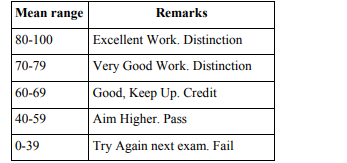
For example, write a program to capture English, Kiswahili, Mathematics and Science marks scored by a
student in an exam. The program remarks as follows based on student’s mean score: -
 PROGRAM commenting(input, output);
VAR eng,kis,mat,sci:Integer;
Avg:real;
Comment:string;
BEGIN
Writeln;writeln;
Write(‘Enter English, Kiswahili, Mathematics and Science’);
Readln(eng,kis,mat,sci);
Avg:=(eng+kis+mat+sci)/3;
If ((Avg>=60) AND (AVG<=100)) then
Comment:=‘Excellent Work. Distinction’
ElseIf ((Avg>=70) AND (AVG<=79)) then
Comment:=‘Very Good Work. Distinction’
ElseIf ((Avg>=60) AND (AVG<=69)) then
Comment:=‘Good, Keep Up. Credit’
ElseIf ((Avg>=40) AND (AVG<=59)) then
Comment:=‘Aim Higher. Pass’
Else
Comment:=‘Try Again next exam. Fail’;
Writeln;
Writeln(comment);
Readln;
END;
Exercise
Write a program that prompts the user to enter two numbers and operator of the process to be performed.
Basing on the operator, the program process and outputs the answer on the screen. Otherwise, if the operator is invalid (not either /,+,- or *) the program dismisses with error message.
CASE .. OF
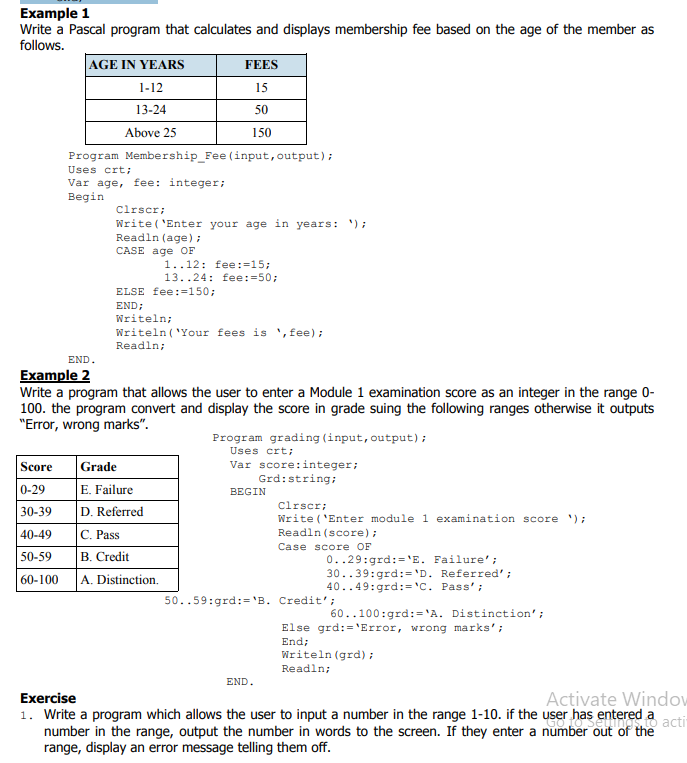
It is the alternative to nested IF control structure and preferred in some cases to reduce unnecessary program code. For instance, suppose you wanted to branch one way if b is 1, 7, 2037, or 5; and another way
if otherwise. You could do it by:
if (b = 1) or (b = 7) or (b = 2037) or (b = 5) then
Statement1
Elseif (b>1) and (b<7) then
Statement2
else
Statement3;
But in this case, it would be simpler to list the numbers for which you want Statement1 to execute. You
would do this with a case statement:
case b of
1,7,2037,5: Statement1;
2..6: Statement2;
otherwise Statement3
end;
The general form of the case statement is:
case selector of
List1: Statement1;
List2: Statement2;
...
Listn: Statementn;
otherwise Statement
end;
Or for block of statements
case selector of
List1: BEGIN
Statement1;
Statement2;
END;
List2: BEGIN
Statement3;
Statement4;
END;
...
...
otherwise BEGIN
Statementn;
Statementn+1;
END
END;
The otherwise part is optional and can be replaced with else as shown below.
case selector of
List1: Statement1;
List2: Statement2;
...
Listn: Statementn;
else Statement
end;
 Looping Control Structures
These are group of control structures that cause a block of program statements to be executed multiple
times. A loop is a section of code that repeats itself. A loop index or loop counter is an integer variable that
is used to keep track of how many times a loop has been executed. A loop limit is a variable or constant
that is integer valued, which determines the number of times a loop will execute, or a maximum value of
the loop index to be reached at the loop termination. They include:
1. FOR..DO
2. WHILE .. DO
3. REPEAT .. UNTIL
FOR .. DO
Looping means repeating a statement or compound statement over and over for specific number of times.
In Pascal, the fixed repetition loop is the for loop. The general form is:
FOR loop-index := initial-value to final-value DO
statement;
Where loop-index is the counter to be incremented
Initial-value is the beginning value of the loop index
Final-value is the ending value of the loop index.
For example
Write a program that outputs number 1-20 on vertically on the screen.
Program Numbers_1_20(output);
Uses crt;
Var counter:integer;
Begin
Clrscr;
For counter:=1 to 20 do
Writeln(counter);
Readln;
End.
The index variable must be of an ordinal data type. You can use the index in calculations within the body of
the loop, but you should not change the value of the index. An example of using the index is a program
that sums all whole numbers from 1 to 100:
Program sum_1_100(output);
Uses crt;
Var count,sum:integer;
Begin
sum := 0;
for count := 1 to 100 do
sum := sum + count;
Writeln(‘The sum of whole numbers from 1 to 100 is ‘,sum);
Readln;
End.
In the for-to-do loop, the starting value MUST be lower than the ending value, or the loop will never execute! If you want to count down, you should use the for-downto-do loop:
for index := StartingHigh downto EndingLow do
statement;
For example, a program that outputs numbers from 1 to 20 in descending order
Program Numbers_20_1(output);
Uses crt;
Var counter:integer;
Begin
Clrscr;
For counter:=20 downto 1 do
Writeln(counter);
Readln;
End.
Exercise
Write a program that display even numbers between 1 and 30 horizontally on the screen.
WHILE..DO
It is a conditional loop that is initiated and program statement(s) continues to be executed until a certain
condition is met/ satisfied. The statements may or never be executed at all basing on the condition set.
The pretest loop has the following format:
loop_initialization;
while BooleanExpression do
statement;
The loop continues to execute until the Booleanexpression becomes FALSE. In the body of the loop,
you must somehow affect the Boolean expression by changing one of the variables used in it. Otherwise an infinite loop will result:
a := 5;
while a < 6 do
writeln (a);
Remedy this situation by changing the variable's value:
a := 5;
while a < 6 do
begin
writeln (a);
a := a + 1
end;
The WHILE ... DO lop is called a pretest loop because the condition is tested before the body of the loop
executes. So if the condition starts out as FALSE, the body of the while loop never executes.
For example a program that displays number from 10 to 30 on horizontally on the screen.
Program nos_10_30(output);
CONST MAX=30;
VAR index:integer;
BEGIN
Index:=10; {Initialize first number to be displayed}
WHILE (index<=30) DO BEGIN
Write(index:5);
Index:=index+1; {increment index to next value in the series}
End;
Readln;
END.
REPEAT..UNTIL
It is a posttest loop, that is, it is similar to WHILE .. DO loop except that a condition is tested at the end of
block of statements, therefore statements are executed at least once. It has the following format:
loopinitilization;
repeat
statement1;
statement2
until BooleanExpression;
In a repeat loop, compound statements are built-in -- you don't need to use BEGIN-END. Also, the loop
continues until the Boolean expression is TRUE, whereas the while loop continues until the Boolean expression is FALSE.
This loop is called a posttest loop because the condition is tested AFTER the body of the loop executes.
The REPEAT loop is useful when you want the loop to execute at least once, no matter what the starting
value of the Boolean expression is.
For example a program that displays number from 10 to 30 on horizontally on the screen.
Program nos_10_30(output);
CONST MAX=30;
VAR index:integer;
BEGIN
Index:=10; {initialize first number to be displayed}
REPEAT
Write(index:5);
Index:=index+1; {increment index to next value in the series}
UNTIL (index>30); {repeat until the condition is true}
Readln;
END
These are values that which do not change during programs execution. An example would be the value of
PI, 3.141592654. In a program required to calculate the circumference of several circles, it would be simpler to write the word PI, instead of its value 3.141592654.
To declare constants, the keyword CONST is used, followed by the name of the constant, an equals sign,
the constants value, and semi-colon, eg,
CONST PI=3.141592654;
For example, a program to compute the area of a circle would be,
Program CIRCUMFERENCE (Input, Output);
Const PI=3.141592654;
Var Circumfer, Diameter: Real;
Begin
Writeln(‘Enter the diameter of the circle’);
Readln(Diameter);
Circumfer:=PI*Diameter;
Writeln(‘The circumference of the circle is ‘,Circumf:6:2);
End.
Exercise, write a program which prompts the user to input ordinary time and overtime worked, calculating
the gross pay. The rate is 4.20 per hour, and overtime is two times and half the rate.