STRUCTURED PROGRAMMING
3. PROGRAMMING IN PASCAL
When talking about computer languages, there are basically three major terms that will be used.
1. Machine language -- actual binary code that gives basic instructions to the computer's CPU. These
are usually very simple commands like adding two numbers or moving data from one memory location
to another.
2. Assembly language -- a way for humans to program computers directly without memorizing strings
of binary numbers. There is a one-to-one correspondence with machine code. For example, in Intel x86
machine language, ADD and MOV are mnemonics for the addition and move operations.
3. High-level language -- permits humans to write complex programs without going step-by step. High
-level languages include Pascal, C, C++, FORTRAN, Java, BASIC, and many more. One command in a
high-level language, like writing a string to a file, may translate to dozens or even hundreds of machine
language instructions.
All computers can only run machine language programs directly. Assembly language programs
are assembled, or translated into machine language. Likewise, programs written in high-level languages,
like Pascal, must also be translated into machine language before they can be run. The technical
terminology for this operation is compiling.
The program that accomplishes the translation is called a compiler. This program is rather complex since it
not only creates machine language instructions from lines of code, but often also optimizes the code to run
faster, adds error-correction code, and links the code with subroutines stored elsewhere. For example,
when you tell the computer to print something to the screen, the compiler translates this as a call to a prewritten module. Your code must then be linked to the code that the compiler manufacturer provides before
an executable program results.
With high-level languages, there are again three terms to remember:
1. Source code -- the code that you write. This typically has an extension that indicates the language
used. For example, Pascal source code usually ends in ".PAS" and C++ code usually ends in ".CPP"
2. Object code -- the result of compiling. Object code usually includes only one module of a program,
and cannot be run yet since it is incomplete. On DOS/Windows systems, this usually has an extension
of ".OBJ"
3. Executable code -- the end result. All the object code modules necessary for a program to function
are linked together. On DOS/Windows systems, this usually has an extension of ".EXE"
Program Structure
The basic structure of a Pascal program is:
PROGRAM ProgramName (Input, Output);
CONST
(* Constant declarations *)
TYPE
(* Type declarations *)
VAR
(* Variable declarations *)
(* Subprogram definitions *)
BEGIN
(* Executable statements *)
End.
The elements of a program must be in the correct order, though some may be omitted if not needed.
Here's a program that does nothing, but has all the REQUIRED elements:
program DoNothing;
begin
end.
Pascal comments start with a (* and end with a *). You can't nest comments:
(* (* *) *)
will yield an error because the compiler matches the first (* with the first *), ignoring everything in
between. The second *) is left without its matching (*.
In Turbo Pascal, {Comment} is an alternative to (* Comment *). The opening brace signifies the beginning
of a block of comments, and the ending brace signifies the end of a block of comments.
Commenting has two purposes: first, it makes your code easier to understand. If you write your code
without comments, you may come back to it a year later and have a lot of difficulty figuring out what
you've done or why you did it that way. Another use of commenting is to figure out errors in your program.When you don't know what is causing an error in your code, you can comment out any suspect code
segments. Remember the earlier restriction on nesting comments? It just so happens that braces {}
supersede parenthesis-stars (* *). You will NOT get an error if you do this:
{ (* Comment *) }
So, if you have Turbo Pascal, I suggest using standard comments (* *), leaving the braces for debugging.
All spaces and end-of-lines are ignored by the Pascal compiler unless they are inside a string. However, to
make your program readable by human beings, you should indent your statements and put separate
statements on separate lines.
Identifiers
Identifiers are names that allow you to reference stored values, such as variables and constants. Also,
every program must be identified (get it?) by an identifier.
Rules for identifiers:
Must begin with a letter from the English alphabet.
Can be followed by alphanumeric characters (alphabetic characters and numerals), or the underscore
(_).
May not contain special characters, such as:~ ! @ # $ % ^ & * _ + ` - = { } [ ] : " ; ' < > ? , . / | \
Several identifiers are reserved in Pascal -- you cannot use them as your own identifiers. They are:
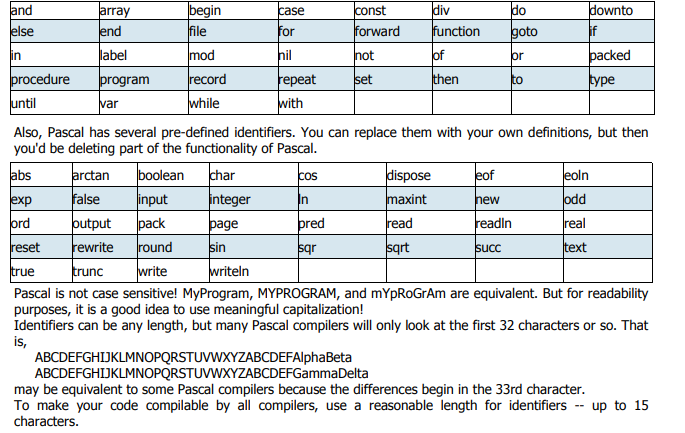
V a r i a b l e s a n d D a t a T y p e s
Variables are similar to constants, but their values can be changed as the program runs. Unlike in BASIC
and other loosely-typed languages, variables must be declared in Pascal before they can be used:
var
IdentifierList1 : DataType1;
IdentifierList2 : DataType2;
IdentifierList3 : DataType3;
...
IdentifierList is a series of identifiers, separated by commas (,). All identifiers in the list are declared as
being of the same data type.
The main data types in Pascal are:
1. integer data type can contain integers from -32768 to 32767.
2. The real data type has a positive range from 3.4x10-38 to 3.4x1038. Real values can be written in
either fixed-point notation or in scientific notation, with the character E separating the mantissa from
the exponent. Thus, 452.13 is the same as 4.5213e2
3. The char data type holds characters. Be sure to enclose them in single quotes, or apostrophes: 'a',
'B', '+'. This data type can also hold system characters, such as the null character (ordinal value of 0)
and the false-space character (ordinal value of 255).
4. The Boolean data type can have only two values: TRUE and FALSE
5. The String data type holds a group of characters enclosed in single quotation mark such as ‘DICT’, ‘My
names are’ etc.
An example of declaring several variables is:
var
age, year, grade : integer;
circumference : real;
LetterGrade : char;
DidYouFail : Boolean;
A s s i g n m e n t a n d O p e r a t i o n s
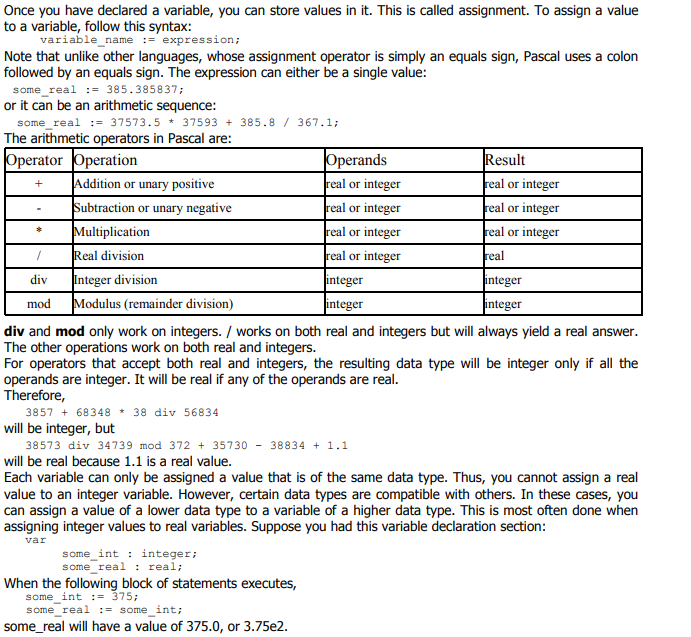 In Pascal, the minus sign can be used to make a value negative. The plus sign can also be used to make a
value positive. This, however, is unnecessary because values default to being positive.
Do not attempt to use two operators side by side!
some_real := 37.5 * -2;
This may make perfect sense to you, since you're trying to multiply by negative-2. However, Pascal will be
confused -- it won't know whether to multiply or subtract. You can avoid this by using parentheses:
some_real := 37.5 * (-2);
to make it clearer.
The computer follows an order of operations similar to the one that you follow when you do arithmetic:
* / div mod
+ -
The computer looks at each expression according to these rules:
1. Evaluate all expressions in parentheses, starting from the innermost set of parentheses and proceeding
to the outermost.
2. Evaluate all multiplication and division from left to right.
3. Evaluate all addition and subtraction from left to right.
The value of
3.5 * (2 + 3)
will be 17.5.
Pascal cannot perform standard arithmetic operations on Booleans. There is a special set of Boolean
operations. Also, you should not perform standard operations on characters because the results may vary
from compiler to compiler.
Punctuation and Indentation
Since Pascal ignores end-of-lines and spaces, punctuation is needed to tell the compiler when a statement
ends.
You MUST have a semicolon following:
the program heading
each constant definition
each variable declaration
each type definition (to be discussed later)
almost all statements
The last statement in the program, the one immediately preceding the END, does not require a semicolon.
However, it's harmless to add one, and it saves you from having to add a semicolon if suddenly you had to
move the statement higher up.
Indenting is not required. However, it is of great use for the programmer, since it helps to make the
program clearer. If you wanted to, you could have a program look like this:
program Stupid; const a=5; b=385.3; var alpha,beta:real; begin alpha := a + b; beta:= b / a end.
But it's much better for it to look like this:
program Stupid;
const
a = 5;
b = 385.3;
var
alpha,
beta : real;
begin (* main *)
alpha := a + b;
beta := b / a
end. (* main *)
In general, indent two to four spaces for each block. Skip a line between blocks (such as between the
const and var blocks).
Most importantly, use comments liberally! If you ever return to a program that you wrote ten years ago,
you probably wouldn't remember the logic unless you documented it. It is a good idea to comment the
main executable part of the program, to distinguish it from subprograms.
Input
Input means to read data into memory, either from the keyboard, the mouse, or a file on disk.
We will not get into mouse input in detail, because that syntax differs from machine to machine, and may
require a complicated interrupt call to the mouse driver. If you would like to see the source code for a
mouse support unit for DOS, click here. This unit will not work under Windows, Macintosh, or X-Windows,
because these operating systems handle all mouse input for you and do not let you interface with the
mouse directly.
The basic format for reading in data is:
read (Variable_List);
Variable_List is a series of variable identifiers separated by commas.
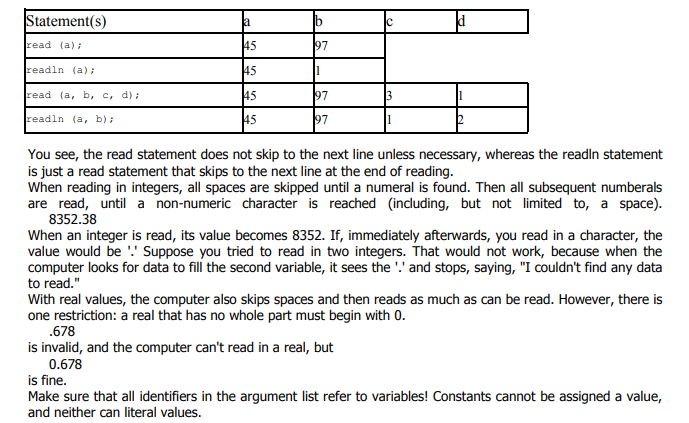
read, however, does not go to the next line. This can be a problem with character input, because the endof-line character is read as a space.
To read data and then go on to the next line, use
readln (Variable_List);
Suppose you had this input from the user, and a, b, c, and d were all integers.
45 97 3
1 2 3
This would be the result of various statements:
 Output
For writing data to the screen, there are also two statements:
write (Argument_List);
writeln (Argument_List);
The writeln statement skips to the next line when done. You can use strings in the argument list, either
constants or literal values. If you want to display an apostrophe within a string, use two consecutive
apostrophes.
Formatting output is quite easy. For each identifier or literal value on the argument list, use:
Value : field_width
The output is right-justified in a field of the specified integer width. If the width is not long enough for the
data, the width specification will be ignored and the data will be displayed in its entirety (except for real
values -- see below).
Suppose we had:
write ('Hi':10, 5:4, 5673:2);
The output (with a dash simulating the space) would be:
--------Hi---55673
For real values, you can use the aforementioned syntax to display scientific notation in a specified field
width, or you can convert to fixed notation with:
Value : field_width : decimal_field_width
The field width is the total field width, including the decimal part. The whole number part is always
displayed fully, so if you have not allocated enough space, it will be displayed anyway. However, if the
number of decimal digits exceeds the specified decimal field width, the output will be rounded to the
specified number of places (though the variable itself is not changed).
So
write (573549.56792:20:2);
would look like:
-----------573549.57
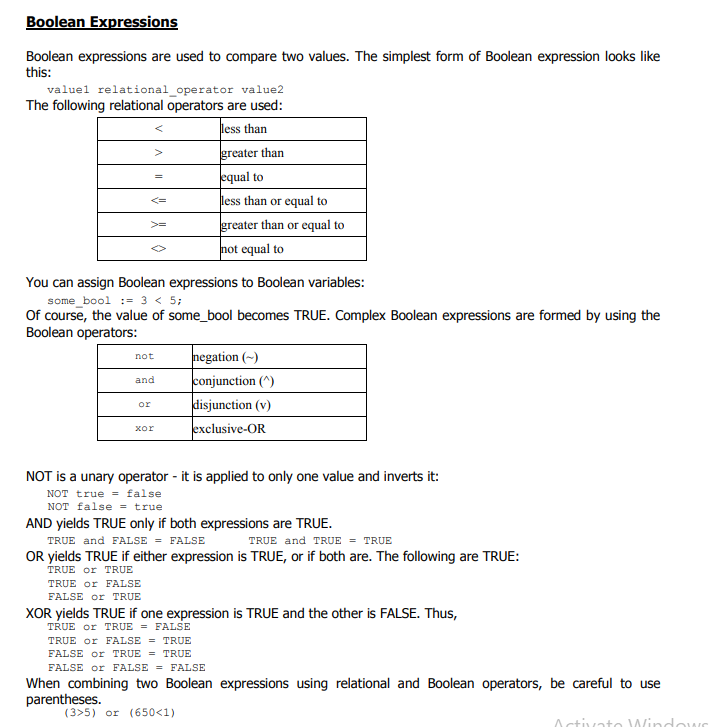 This is because the Boolean operators are higher on the order of operations than the relational operators:
not
* / div mod and
+ - or
< > <= >= = <>
This way,
3 > 5 or 650 < 1
becomes evaluated as
3 > (5 or 650) < 1
which makes no sense, because the Boolean operator or only works on Boolean values, not on integers.
The Boolean operators (AND, OR, NOT, XOR) can be used on Boolean variables just as easily as they are
used on Boolean expressions.
Whenever possible, don't compare two real values with the equals sign. Small round-off errors may cause
two equivalent expressions to differ