STRUCTURED PROGRAMMING
2. PROGRAM DESIGN AND DEVELOPMENT
PROGRAM DEVELOPMENT LIFECYCLE
These are stages the programmer must follow to come up with a program that solves the indented problem or task. The stages are as illustrated below
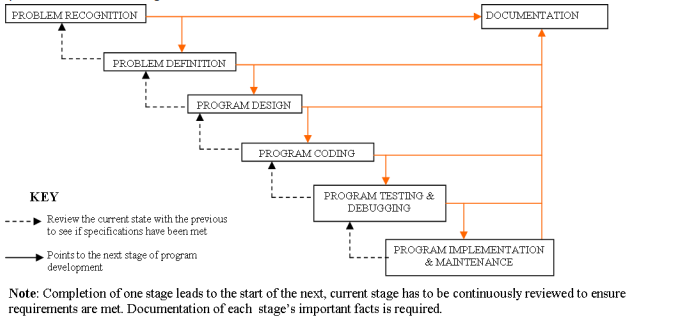 1. Problem recognition: This is the understanding and interpretation of a particular problem. To identify a
problem look for keywords such as compute, evaluate, compare, calculate etc and rewrite the problem
in a simplified way using the keyword. For instance, a mathematical problem of calculating the area of
a circle, is rewritten as A=Пr
2. Problem definition/Analysis: This is when programmer defines the likely input, processing activities and
expected outcome using keywords outlined at the problem recognition stage. This stage outlines a
clear view of what the program should produce, methods that can be used to solve the problem and
best alternative chosen. For instance, our problem A=Пr
2 has,
a. Input radius of the circle r
b. Process calculate the area of the circle П*r*r
c. Output Area of the circle A
3. Program design: This is the stage in which the programmer decides how the various goals of the
program are to be achieved. It shows the logical steps a program follows in order to solve a problem.
The programmer must analyze specifications and decide whether the program is monolithic or modular.
Program design tools such as algorithm, pseudo code, flowchart, structured charts and decision tables.
4. Program coding: This is the process of converting program design into its equivalent program using a
programming language. This stage results into source code program that can be translated into
machine readable form. The program coded should solve the targeted problem.
5. Program testing and debugging: when a programmer write programs, it is rare that the code will be
perfect. The program has to be tested to ensure it yields expected output, detect errors and debug
(correct the error). There are two types of errors (bugs) encountered during testing of a program,
namely: -
a. Syntax errors: These are errors that emanate from improper use of programming language
rule such as grammatical mistakes, misuse/ missing punctuation marks, improper naming of
variables, misspelling of user-defined and reserved words. Syntax errors must be debugged
before running the program.
b. Logical errors: These errors are also known as runtime errors. These are errors that are not
detected by translator but the program gives wrong output or halts during execution.
Methods used to detect errors in a program include the following: -
a. Desk checking (Dry-run): This is going through a program while its still on paper before entering
into programming language editor’s window. This help to detect syntax and logical errors.
b. Using debugging utilities: This is the use of translators to detect syntax errors in a program
already in programming language editor’s window. Most of the programming languages have
development IDEs with compiler that detect syntax errors, outline them and allow the
programmer to correct them before execution.
c. Using test data: This is carrying out trial runs of new program by entering data variation and
extremes (data with errors) to see whether the program halts. A good program should not crash
due to wrong data input but inform the user about the anomaly and request for correct data.
6. Implementation and maintenance: implementation is the actual delivery and installation of the new
program ready for use. Training of staff on use of the program is also done. That implemented
program is then reviewed (incase specifications are not met) and maintained.
Maintenance is an ongoing activity of evaluating implemented program to see whether it is performing
as expected. Errors and shortcomings detected are corrected.
PROGRAM DOCUMENTATION
This is the writing of support information explaining how the program can be used, installed, maintained
and modified. All stages of program development should be well documented. Documentation can be
either: -
a. Internal documentation: These are non-executable lines, called comments, in a source program that
enable a programmer to understand code statements. Internal documentation is part and parcel of
source program code.
b. External documentation: These are reference material for users, operators and programmers printed as
booklets. They specify user-manuals, installation manuals and programmer manuals.
There are three target groups for any documentation, namely: -
a. User-oriented documentation: These are reference material that enable user learn how to use a
program with little help from program developer.
b. Operator-oriented documentation: These are reference material for technical staff, it provides outline
on how to install and maintain the program.
c. Programmer-oriented documentation: This is documentation that provides technical information for the
future medication of the program. All programs need to modification or review to improve their
performance and suit changing environment.