STRUCTURED PROGRAMMING
2. PROGRAM DESIGN AND DEVELOPMENT
2.1. PROGRAM DESIGN TOOLS
PROGRAM DESIGN TOOLS
Program design shows the logical steps a program follows in order to solve a problem. A poorly design
leads to development of a program that does not meet the specifications or indented tasks. Tools used in
program design include:
a. Algorithms,
b. Flowcharts,
c. Pseudo codes,
d. Structured charts and
e. Decision tables
ALGORITHM
It is a set of instructions which when correctly executed produces a solution to given problem. For instance,
an algorithm to find a word in a dictionary or changing a punctured tyre.
There will always be several algorithms (methods) for solving a problem. It is upon the programmer to
make the best choice of the algorithm to use with reasons. The algorithm developed must be easily
converted into computer instructions and therefore must have three categories of instructions: -
a. Input instructions: - Supply data to a program
b. Processing instructions: - Manipulates data into information
c. Output instructions: - Gets information out and present it to the user
For instance, an algorithm to compute the area of a circle (A), the algorithm will be,
Ask user to enter radius of the circle (r)
Store the value in r
Calculate the area of circle Пr
2
Store the value in A
Print the value of A
Stop
Once an algorithm is developed, we must check it to ensure that it does the task correctly by hand using
appropriate data. This is known as dry running or desk checking. Dry running aims at pin-pointing errors in
logic execution before the computer program is written.
PSEUDO CODES
This is a set of statements written in English-like form that express the processing logic of a program.
Some words may be drawn from programming languages and mixed with English to form structured
statements. Pseudo codes are not executable by a computer.
A good pseudo code must have the following features
a. The statement must be short, clear and readable
b. That statements must not have more than one meaning (not ambiguous)
c. Then statement lines should be clearly outlined and indented.
d. Pseudo code show clearly show START and STOP of executable statements and control structures
e. The input, output and processing statements should clearly be stated using keywords such as PRINT,
INPUT, READ etc.
For example, write a pseudo code to computer the area of a circle.
START
PRINT “Enter the radius of a circle”
READ r
A=Пr
2
PRINT A
STOP
Example 2, write a pseudo code that prompts the user to enter two numbers, calculate their sum and
average. Display the two numbers, sum and average on the screen.
START
PRINT “Enter the two numbers”
INPUT no1, no2
Sum=no1+no2
Average=Sum/2
PRINT no1, no2
PRINT Sum, Average
STOP.
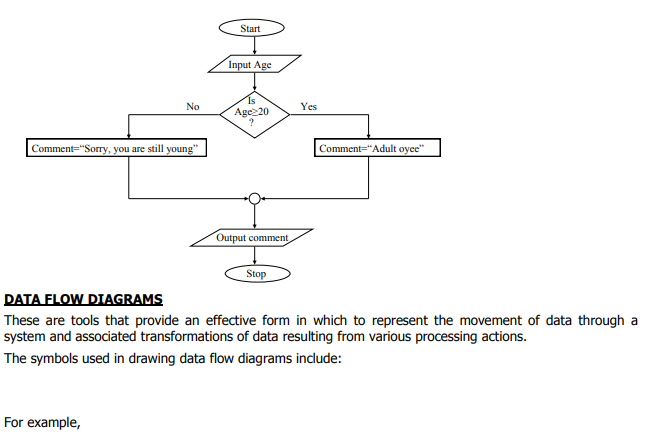
Example 3, write a pseudo code for a program that can be used to classify people according to age. If a
person is 18years and above, the program outputs “Adult, Oyee” otherwise it outputs “Young, Uuh”.
START
PRINT “Enter your age in years”
READ age
IF age≥18 THEN
Comment=“Adult, Oyee”
ELSE
Comment=“Young, Uuh”
PRINT comment
STOP
FLOWCHART
This is the diagrammatic representation of a program’s logical flow of execution using special symbols. The symbols used in program flowchart include;
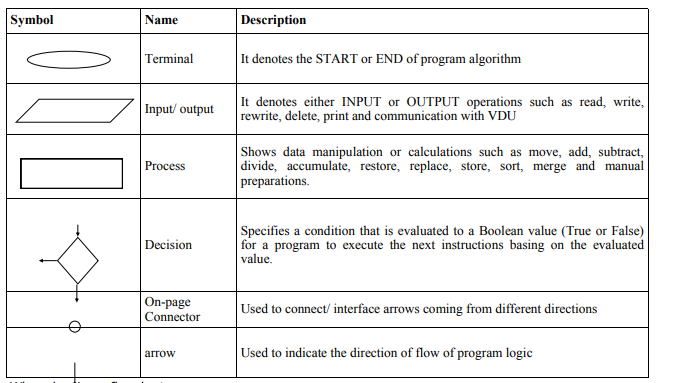 When drawing a flowchart;
i. There should be one starting and exit point of program algorithm
ii. Use correct symbol at each stage in program flowchart
iii. The logical flow of program should be clearly shown using arrows.
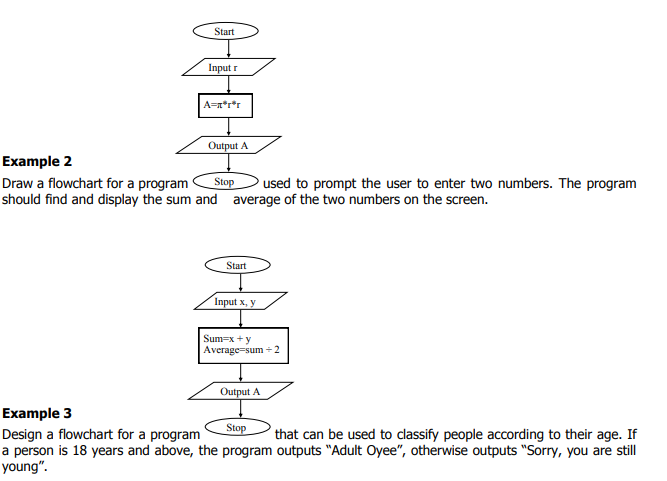
Example 1
Draw a flowchart for a program that calculates the area of a circle whose radius is entered by the user.
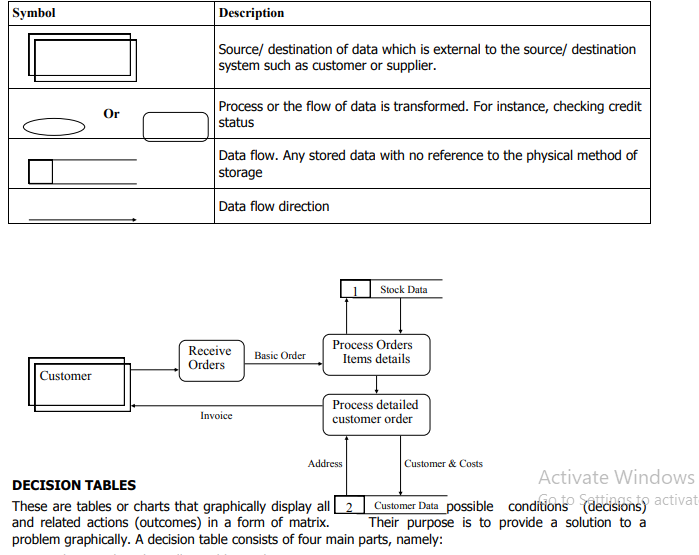 Condition stub: It lists all possible conditions present in a system
Condition entry: Shows all possible combinations of conditions after testing
Action stub: Lists all actions that may be taken to meet specific condition
Action entry: Lists all specific actions that should be followed for each combination of conditions